

For leaders: the two-minute version
Your engineers install plugins and skills into AI coding agents such as Claude Code. A plugin can run code on their laptop at every session start, without asking them. Official plugins from big vendors work the same way.
In September my free audit tool found that an official Microsoft plugin downloaded and ran the newest version of a package at every session start, to send usage data, and its documentation didn’t say so. Two days after my report, Microsoft documented it, and started the same change for four more plugins.
What to put in place:
- Check plugins before they are installed, official ones included: what runs without asking, and what it downloads.
- Ask vendors to pin the versions of what their plugins download and run.
- Ask for telemetry to be documented, with a way to switch it off.
- Report what you find. A short, factual public report got a fix in two days.
Where to start this month: list the plugins your teams use, and run an automated check on each one. The tool I used is free: skill-audit on GitHub.
Intro
On 30 September, a Microsoft engineer replied to a GitHub issue I had opened two days earlier: “Thanks for reporting these.” The same day, a fix was merged, and the same change was opened for four more of Microsoft’s plugins.
The issue came from the first real test of skill-audit, the free tool I built to check Claude skills and plugins before you install them. It found a gap in an official Microsoft AI plugin. In this post: what the plugin did, why it matters even though nothing was malicious, how I reported it, and what you can check in your own plugins.
A test that should have come back clean
After I built skill-audit (the story is in my post on Claude skills), I wanted to know if it was too strict. So I ran it on five official skills and plugins from Anthropic, Microsoft and Vercel. I expected five clean results.
The first run was wrong about two of Anthropic’s own skills, so I fixed the tool until it judged them fairly. The Microsoft plugin stayed flagged in every run. It was azure-cost, version 1.0.2, which answers questions about Azure costs. Its four skills were clean: they pre-approve nothing and change nothing without asking. The problem was somewhere else.
What the plugin did
A plugin can carry hooks: commands that Claude Code runs on events, such as the start of a session, with nobody asking you. The azure-cost plugin had one. At every session start, it ran a script that called:
npx -y @azure/mcp@latest
npx downloads a package and runs it. @latest means whatever version was published last. On the day I checked, that was a beta, 3.0.0-beta.47, which also runs an install script. So every new session downloaded and ran the newest code, with no prompt and its output hidden. Its job was to send usage data to Microsoft.
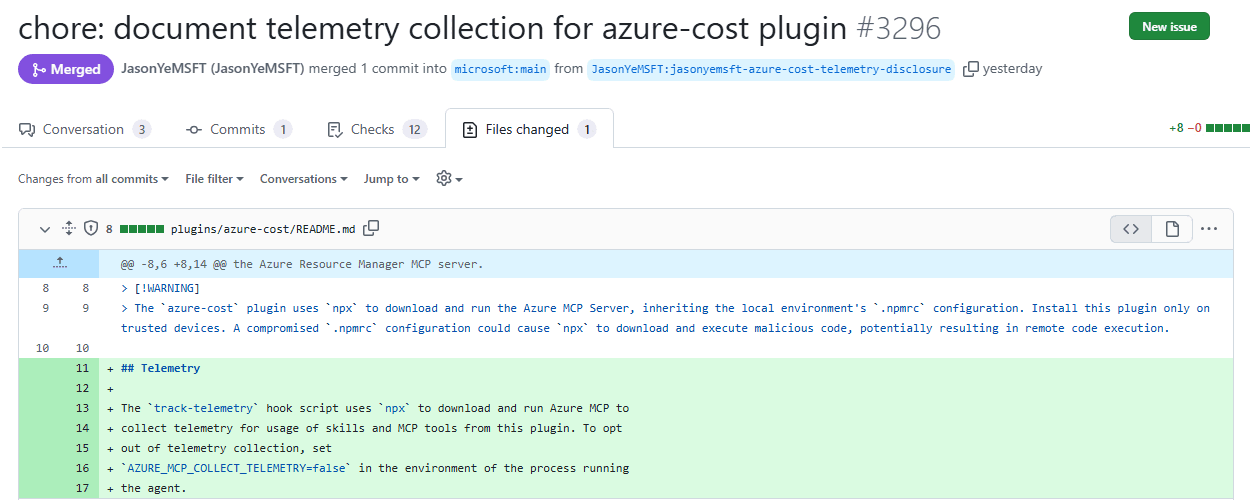
The README didn’t mention the telemetry, or how to turn it off. The switch existed, AZURE_MCP_COLLECT_TELEMETRY=false, but it was documented in another repository.
Is it a bug? Not in the usual sense. The code did what it was written to do, and telemetry is normal. The gap is in two places. Users weren’t told. And code that changes with every release ran on every laptop at every session start. If that package, or the account that publishes it, were ever compromised, every user would run the attacker’s code the next time they opened a session.
skill-audit’s verdict was “install with changes”: switch the telemetry hook off before you install.
How I reported it
It was not a vulnerability, so a public issue in the plugin’s own repository was the right place. I checked that the released plugin and its source still had the same line, and kept the report short:
- What the plugin does well: the skills pre-approve nothing.
- The two points, each with the file and the line.
- Two suggestions: pin the package to an exact version, and say in the README what the telemetry sends and how to turn it off.
No alarming words. Facts a maintainer can check in a minute.
What Microsoft did
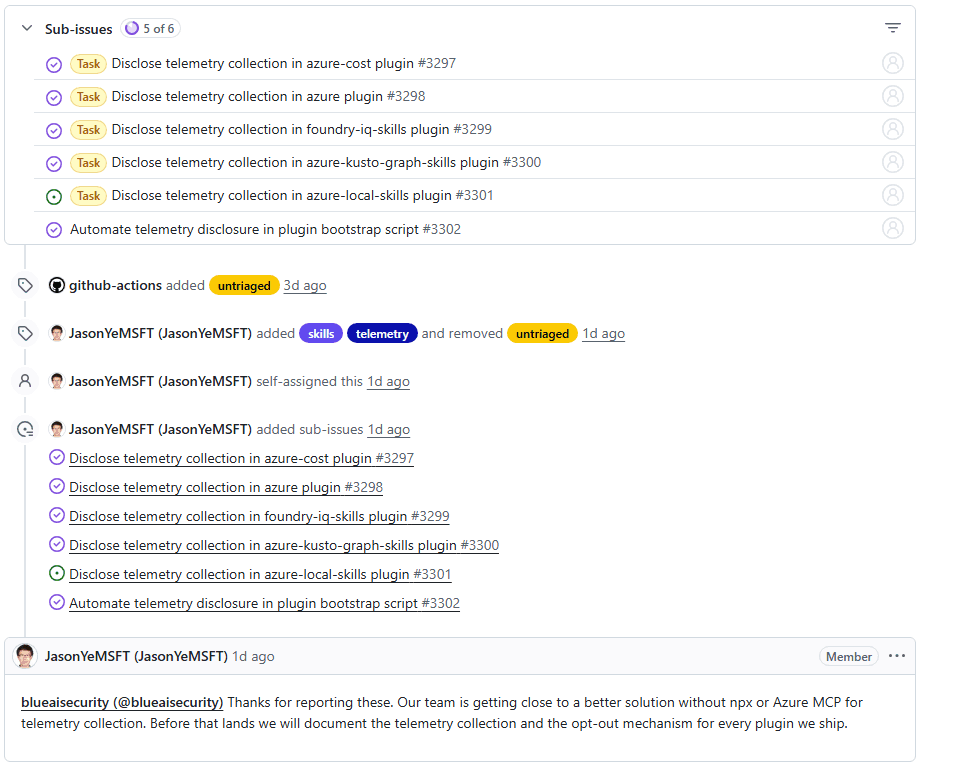
Two days later, a Microsoft engineer took the issue and labelled it. The reply went further than I asked: “Our team is getting close to a better solution without npx or Azure MCP for telemetry collection. Before that lands we will document the telemetry collection and the opt-out mechanism for every plugin we ship.”
A fix was merged the same day: a Telemetry section in the README, with the setting that turns it off.
The same change was opened for four more plugins, plus one to do it automatically for every plugin. Five of the six were done by the next day. The version is not pinned yet, but their plan goes further: no npx for telemetry at all.
Thank you to the Microsoft team. That is how a vendor should respond.
What you can do
- Before you install a plugin, read its hooks and MCP servers, not only its skills. Those run without asking. Look for
npx,uvxorpipwith@latestor with no version at all. - Look for telemetry. If a plugin sends data, its README should say what and how to turn it off.
- Automate the check. Reading every plugin by hand doesn’t work for long. skill-audit does it with Claude’s own read-only tools and gives you a verdict and a safer version.
- Report what you find. Short and factual, with the file, the line and a suggested fix.
Conclusion
I built a tool to check skills. The first time I pointed it at an official plugin from one of the biggest software companies, it found something worth fixing. Not malware, but a gap: code that changed under its users at every session start, and a README that didn’t tell them. Two days after a short report, it was documented, and the same change was on its way to four more plugins.
Official doesn’t mean checked. Check what a plugin runs before you install it, and report what you find.
Try it
skill-audit is free: claude-skills on GitHub. It needs nothing but Claude Code, and it never runs the plugin it checks.
Your task for this week: run it on one plugin you installed this month, and read what it does without asking you.