

Intro
It’s finally here! I hope you’re as excited as I am to dive into this post. Today, we’re exploring agentic systems with CrewAI. CrewAI is an agentic framework known for its simplicity and effectiveness. I’ve chosen this platform because it’s open source, beginner-friendly, and production-ready. Best of all, the fundamentals you learn transfer seamlessly to other agentic platforms.
This will be an introductory post, but I encourage you to check out my earlier posts if you haven’t already, as they’ll give you a better understanding of AI fundamentals.
What are AI agents?
Let’s begin by defining AI agents. In simple terms, AI agents are systems that function autonomously to complete tasks. Unlike traditional AI that only responds to prompts and depends on user input and guidance, agents can choose their actions, use tools, and figure out how to complete tasks on their own.
Agents think and act autonomously to solve problems, not just answer questions
AI agents have been making waves in AI news, and they aren’t going anywhere. Why? Because they dramatically expand what AI systems can do. Some of their core capabilities include accessing external resources, collaborating with other agents, planning multi-step solutions, reasoning through complex problems, and evaluating their own decisions (all without constant human supervision).
Breaking Free from Static AI
Before exploring Agentic AI further, let’s first understand why agents are a natural step forward from earlier AI systems.
Early AI systems had a fundamental limitation: they were static and reactive. Generative AI introduced simple prompt-based interactions that were impressive but limited. The initial interaction with Gen AI looked like this:
You ask → AI processes → you get an answer. That’s it.
Retrieval-Augmented Generation (RAG) marked a major advance by giving AI access to up-to-date and domain-specific data via vector databases. However, its process remained static:
You ask → AI retrieves additional data → AI processes → you get an answer.
What if your AI needs to:
• Access multiple data sources beyond a single database?
• Search the internet, call different APIs, or use external tools?
• Break down complex problems into manageable steps?
• Evaluate its own work and self-correct?
• Collaborate with other AI systems/models to solve complex problems?
This is where agents come into play. They turn AI from reactive responders into autonomous problem-solvers. Agents go beyond traditional AI: they think for themselves, connect to the real world through tools and APIs, learn and adapt from their experiences, collaborate in multi-agent teams, and make decisions collectively. This is what brings AI to life!
> Agents Connect to the Real World
Traditional AI is limited by its cutoff date for training data. Ask it about yesterday’s security breach, and it won’t know. Agents bypass this limit by accessing real-time information and tools.
Agents can search for the latest CVEs, retrieve threat intelligence, access current documentation, call APIs, query databases, and much more. The best part? The agent decides when and how to use these tools based on its goal (you’re not hardcoding the logic).
Behind the scenes, the agent formulates queries, evaluates results, performs follow-up searches if needed, and synthesizes information from multiple sources—all independently.
> Agents Think for Themselves
This is where agents truly shine. Unlike rigid scripts that follow fixed steps, agents reason through problems and choose their own path. You set the goal; the agent figures out how to achieve it.
Consider a security incident: you alert an agent about unusual outbound traffic without instructing them on how to investigate. The agent independently analyzes the situation, selects appropriate tools, assesses the severity, determines if further investigation is necessary, and plans response actions.
> Agents Learn and Adapt
Unlike traditional AI, which requires human review, agents can self-critique and improve automatically.
An agent analyzing a suspicious email first detects threats: unusual sender patterns, suspicious links, urgent language. Then it reviews its own analysis: “Did I miss attack vectors? Are there new phishing techniques to check? Should I verify domain reputation?”
If gaps are found, it re-runs the analysis with extra checks. If confidence remains low, it consults another specialized agent—all without human help.
This self-correcting ability makes agents much more reliable than traditional one-time AI responses.
> Building Agent Teams
Instead of using one agent to do everything, you can create a team of specialized agents. Each agent focuses on a specific task and can use a different AI model that’s best suited for that job.
For example, your research agent might use a model good at analysis, your writing agent uses one designed for clear summaries, and your security agent uses a model trained to spot threats.
The result? Each agent does what it’s best at, leading to better overall performance.
> Multi-Agent Decision Making
The real magic happens when these agents work together and make decisions on their own. A triage agent looks at incoming alerts. An investigation agent digs into suspicious activity. A response agent decides how to handle threats.
Each agent makes its own choices based on what it knows best, while all of them work toward the same goal. This teamwork allows them to solve problems faster and more effectively than a single agent working alone.
Sounds exciting, right? But here’s the thing, reading about agents and building them are completely different experiences. These concepts will click once you see them in action. So let’s build your first agentic system together!
Your First Agentic System with CrewAI
Environment Setup
Setup Required: For this lab, you’ll need a Gemini API key from Google AI Studio. Here’s how to get one:
• Create a free Google Cloud account (new users get $300 in free credits)
• Import your account/project to Google AI Studio
• Generate API key
Alright, I hope you were able to generate API key for AI Studio (if not, a quick Google search will show you plenty of step-by-step guides). Now we’re going to build our first system using CrewAI. CrewAI is one of the top agentic AI frameworks for creating multi-agent systems and one of my favorites (I hope it will quickly become yours too).
Let’s start by installing CrewAI. I will use VS Code on Windows and program in Python. Since we will install multiple libraries, to avoid conflicts, I recommend setting up a separate environment for this project. You can do this by running the following command in your terminal:
python -m venv myenv #create a new virtual environment
cd ./myenv/scripts/activate #change directory
Next, you need to install CrewAI using pip:
pip install crewai
pip install crewai-tools
pip install "crewai[google-genai]" #We will use Google Gemini
Get the API key from aistudio.google.com, NOT Vertex AI. The AI Studio is designed for developers and gives you a simple API key. Vertex AI is for enterprise users and has a more complex setup.
Next, in your environment, create a .env file where you’ll store:
Model name (MODEL=gemini/gemini-2.0-flash-lite-001) and API key (GEMINI_API_KEY=
Security Reminder:
• Never commit .env files to version control (add to .gitignore)
• Never share your actual API keys publicly
• Rotate API keys if accidentally exposed
• Use environment-specific keys (dev/prod separation)
• Make sure your .gitignore includes: .env *.env .env.local
Finally, create a Python file main.py to define code. Your environment should look similar to this:
my_project/
/.gitignore     ## automatically created in new virtual environment - files to exclude from version control
/README.md      ## automatically created in new virtual environment - your project description
/.env           ## file with environmental variables  (stores API KEYS)
/main.py        ## your Python file
> Understanding CrewAI Components
CrewAI offers two approaches to agentic AI: Crews and Flows. In this post we’re going to focus on Crews. Crews are simpler but powerful - perfect for beginners.
Each Crew needs to have:
• Agents - “A list of agents that are part of the crew”
• and Tasks - “A list of tasks assigned to the crew”
*Other optional attributes are available, and we’ll cover them in future posts (you can review them here: https://docs.crewai.com/en/concepts/crews)
Agents
In CrewAI, Agents are autonomous entities, where each one has:
• Role: “Defines the agent’s function and expertise within the crew.”
• Goal: “The individual objective that guides the agent’s decision-making.”
• Backstory: “Provides context and personality to the agent, enriching interactions.”
*Other optional attributes are available, and we’ll cover them in future posts (you can review them here: https://docs.crewai.com/en/concepts/crews)
Tasks
Within the CrewAI framework, Tasks are specific assignments given to Agents to complete. Each task has:
• Description: “A clear, concise statement of what the task entails.”
• Expected Output: “A detailed description of what the task’s completion looks like”
> Building your first single-agent system with CrewAI
Now let’s use this knowledge to build our first crew, agent, and task, then review the results together.
import os
from dotenv import load_dotenv
from crewai import LLM, Agent
from crewai import Task
from crewai import Crew

# Optional: Handle SSL certificates in corporate/restricted environments
# Only needed if you encounter SSL verification issues
#import truststore
#truststore.inject_into_ssl()

# Load environment variables from .env file (keeps API keys secure and out of code)
load_dotenv()

# Define LLM
llm = LLM(
    model = "gemini/gemini-2.5-flash-lite",
    temperature=0.1,  # Low temperature (0.0-0.3) for consistent, focused responses; higher values (0.7-1.0) increase creativity
    api_key=os.getenv("GEMINI_API_KEY")
)

# Define a Security Agent
security_analyst = Agent(
    role="Security Analyst",
    goal="Analyze and explain cybersecurity threats in simple terms",
    backstory="You are a cybersecurity expert who makes complex security concepts easy to understand",
    verbose=False,
    llm=llm
)

# Define a Task
analysis_task = Task(
    description="""Analyze the security threat: {threat} and explain how it works""",
    agent=security_analyst,
    expected_output="""A clear, concise explanation of the threat including how it works and basic protection measures"""
)

# Define a Crew
crew = Crew(
    agents=[security_analyst],
    tasks=[analysis_task],
    verbose=True #for troubleshooting
)
# Pass threat, and collect the response
response = crew.kickoff(inputs={"threat": "phishing attacks"})

print(response)
> Results:
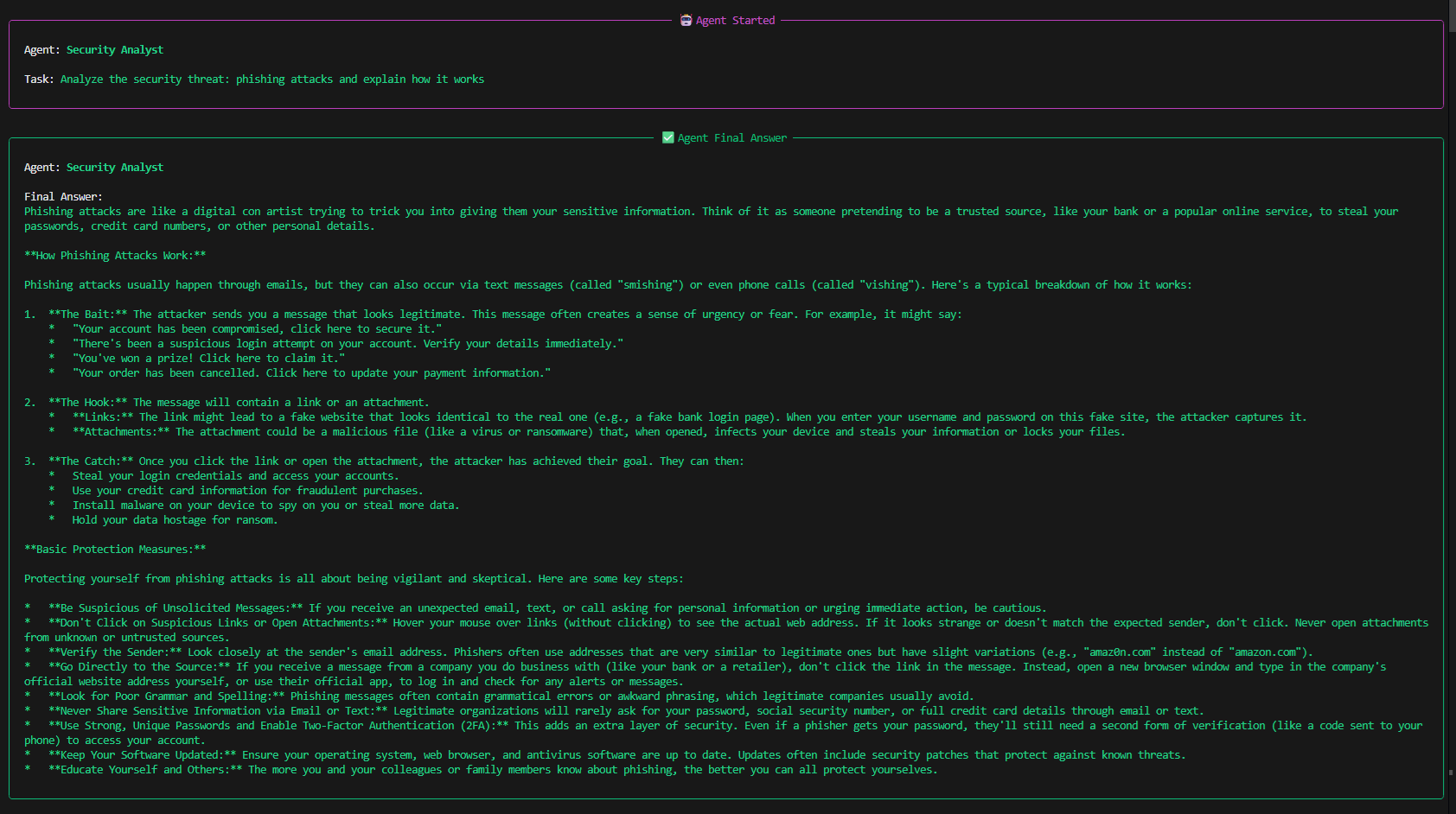
That single agent absolutely crushed it! Pretty straightforward, right? Next, try adding another agent on your own, or move to the next section to build it with me.
> Building multi-agent system with CrewAI
Moving forward, we’ll build multi-agent systems with specialized agents that collaborate and execute dynamic workflows using tools! (You can review CrewAI’s available tools here: https://docs.crewai.com/en/tools/overview)
Our next system will have two agents. The execution will proceed in order: the first agent uses a tool (FileReadTool) to retrieve data from a file, then hands it off to the second agent, who analyzes the data and creates the final report.
Start from creating a sample data file at “./data/security_data.txt”
mkdir data -Force; "Security Incident Log - January 2026`n`nIncident 1: Phishing attempt detected on 15th Jan`n- 50 employees received suspicious emails`n- 3 employees clicked on malicious links`n- No data breach occurred`n`nIncident 2: Outdated software vulnerability on 20th Jan`n- Critical security patch missing on 5 servers`n- Potential for remote code execution`n- Patched within 24 hours" | Out-File data\security_data.txt
Then update the code as following:
import os
from dotenv import load_dotenv
from crewai import LLM, Agent, Task, Crew
from crewai_tools import FileReadTool

# Optional: Handle SSL certificates in corporate/restricted environments
import truststore
truststore.inject_into_ssl()

# Load environment variables from .env file
load_dotenv()

# Define LLM
llm = LLM(
    model="gemini/gemini-2.5-flash-lite",
    temperature=0.1,
    api_key=os.getenv("GEMINI_API_KEY")
)

# Initialize the File Reading Tool
file_tool = FileReadTool(
    file_path='./data/security_data.txt'  # Update with your file path
)

# Agent 1: Data Retrieval Specialist
data_retriever = Agent(
    role="Data Retrieval Specialist",
    goal="Extract and summarize relevant security data from files",
    backstory="You are an expert at finding and extracting key information from documents and data files",
    verbose=True,
    llm=llm,
    tools=[file_tool]  # This agent has access to the file reading tool
)

# Agent 2: Security Report Writer
report_writer = Agent(
    role="Security Report Writer",
    goal="Create comprehensive and well-structured security reports",
    backstory="You are a skilled technical writer who transforms raw data into clear, actionable security reports",
    verbose=True,
    llm=llm
)

# Task 1: Retrieve data from file
retrieval_task = Task(
    description="""Use the file reading tool to read the file located at './data/security_data.txt'.
    Extract all relevant information about security threats, incidents, or vulnerabilities.
    Summarize the key findings clearly.""",
    agent=data_retriever, #Assign this task to Data Retrieval Specialist
    expected_output="A structured summary of all security-related information found in the file"
)


# Task 2: Create report from retrieved data
report_task = Task(
    description="""Using the data provided by the Data Retrieval Specialist, create a comprehensive
    security report that includes:
    - Executive summary
    - Detailed findings
    - Risk assessment
    - Recommended actions""",
    agent=report_writer, #Assign this task to Security Report Writer
    expected_output="A professional security report with clear sections and actionable recommendations",
    context=[retrieval_task]  # This links the tasks - report_task receives output from retrieval_task
)

# Create a Crew with both agents
crew = Crew(
    agents=[data_retriever, report_writer],
    tasks=[retrieval_task, report_task],
    verbose=True
)

# Execute the crew workflow
print("Starting two-agent workflow...\n")
response = crew.kickoff()

print("\n Final Report:")
print(response)
Easy, right?! If you crushed it, try defining additional LLM and have each of your agents use a different model.
HINT
Define a second LLM instance (e.g., llm_pro = LLM(model=”gemini/gemini-2.0-flash-thinking”, api_key=os.getenv(“GEMINI_API_KEY”)))
Assign it to one of your agents using the llm parameter.
For example, set data_retriever to use Gemini 2.5 Flash Lite for quick data extraction while report_writer uses Gemini 2.0 Flash Thinking for deeper analysis and reasoning. This lets you leverage the strengths of different models for different tasks!
Solution
import os
from dotenv import load_dotenv
from crewai import LLM, Agent, Task, Crew
from crewai_tools import FileReadTool

# Optional: Handle SSL certificates in corporate/restricted environments
import truststore
truststore.inject_into_ssl()

# Load environment variables from .env file
load_dotenv()

# Define LLM for data retrieval (lighter, faster model)
llm_lite = LLM(
    model="gemini/gemini-2.5-flash-lite", # List of available LLMS - https://docs.crewai.com/en/concepts/llms
    temperature=0.1,
    api_key=os.getenv("GEMINI_API_KEY")
)

# Define LLM for report writing (more advanced model)
llm_pro = LLM(
    model="gemini/gemini-2.0-flash-thinking", # List of available LLMS - https://docs.crewai.com/en/concepts/llms
    temperature=0.3,
    api_key=os.getenv("GEMINI_API_KEY")
)

# Initialize the File Reading Tool
file_tool = FileReadTool(
    file_path='./data/security_data.txt'
)

# Agent 1: Data Retrieval Specialist (uses lighter model)
data_retriever = Agent(
    role="Data Retrieval Specialist",
    goal="Extract and summarize relevant security data from files",
    backstory="You are an expert at finding and extracting key information from documents and data files",
    verbose=True,
    llm=llm_lite,  # Using the lighter model for quick extraction
    tools=[file_tool]
)

# Agent 2: Security Report Writer (uses more advanced model)
report_writer = Agent(
    role="Security Report Writer",
    goal="Create comprehensive and well-structured security reports",
    backstory="You are a skilled technical writer who transforms raw data into clear, actionable security reports",
    verbose=True,
    llm=llm_pro  # Using the advanced model for better analysis
)

# Task 1: Retrieve data from file
retrieval_task = Task(
    description="""Use the file reading tool to read the file located at './data/security_data.txt'.
    Extract all relevant information about security threats, incidents, or vulnerabilities.
    Summarize the key findings clearly.""",
    agent=data_retriever,
    expected_output="A structured summary of all security-related information found in the file"
)

# Task 2: Create report from retrieved data
report_task = Task(
    description="""Using the data provided by the Data Retrieval Specialist, create a comprehensive
    security report that includes:
    - Executive summary
    - Detailed findings
    - Risk assessment
    - Recommended actions""",
    agent=report_writer,
    expected_output="A professional security report with clear sections and actionable recommendations",
    context=[retrieval_task]
)

# Create a Crew with both agents
crew = Crew(
    agents=[data_retriever, report_writer],
    tasks=[retrieval_task, report_task],
    verbose=True
)

# Execute the crew workflow
print("Starting two-agent workflow with different LLMs...\n")
response = crew.kickoff()

print("\nFinal Report:")
print(response)
> Connecting Agents to External APIs (CrewAI + VirusTotal via Composio)
In the final example, we’ll build a system that allows AI Agent to retrieve threat intelligence from VirusTotal.
Since CrewAI doesn’t have a built-in VirusTotal tool, we’ll use Composio to bridge the gap. Composio is an integration platform that connects AI agents to external APIs without custom code. It offers 10,000+ production-ready integrations supporting the Model Context Protocol (MCP) and works seamlessly with CrewAI, LangChain, AutoGen, and other frameworks (learn more here:https://composio.dev/toolkits).
We’ll also test different LLMs for this task. Remember to update your .env file with the necessary API keys (e.g., GEMINI_API_KEY, GROQ_API_KEY).
Important Notes Before Starting:
• Test different models
• Watch for rate limits, timeouts, and context window constraints
• Verify your agent uses the actual tool (agents may hallucinate if tools don’t load properly)
• Review Composio docs for troubleshooting (https://composio.dev/)
Step 0: Install Required Packages
• Review the documentation https://composio.dev/toolkits/virustotal/framework/crew-ai and https://docs.composio.dev/docs/providers/crewai.
• Install all libraries required for the code in Step 5.
Step 1: Create Required Accounts (*All available for Free 2/25/2026)
• VirusTotal (https://www.virustotal.com/)
• Composio (https://platform.composio.dev/)
• Groq or Google AI Studio (https://console.groq.com/home)
Step 2: Retrieve API Keys
Get API keys from VirusTotal, Composio, and your chosen LLM provider (I’ll use Groq and Gemini).
Step 3: Configure Composio
• Log in to Composio
• Navigate to Auth Configs → Create Auth Configs
• Search for VirusTotal
• Click Create VirusTotal Auth Config (select API as auth method)
• Click Connect Account
• Enter your External User ID (or use the auto-generated one) - this can be whatever you want (i.e., test_user)
• Provide your VirusTotal API key
Step 4: Update Your .env File
# Composio API Key
# Get it from: https://platform.composio.dev/<workspace_name>/<project_name>/settings/api-keys
COMPOSIO_API_KEY=your_composio_api_key_here

# Google Gemini API Key (Currently Active)
# Get it from: https://aistudio.google.com/apikey
GEMINI_API_KEY=your_gemini_api_key_here

# Groq API Key
# Get it from: https://console.groq.com/keys
GROQ_API_KEY=your_groq_api_key_here
Step 5: Build Your Code
import os
from dotenv import load_dotenv
from composio_crewai import CrewAIProvider
from crewai import LLM, Agent, Crew, Task
from composio import Composio

# Optional: handle SSL certs in restricted environments (e.g., behind Zscaler)
#import truststore
#truststore.inject_into_ssl()

load_dotenv()

#Read API Keys from .env
COMPOSIO_API_KEY = os.getenv("COMPOSIO_API_KEY")
if not COMPOSIO_API_KEY:
    raise ValueError("Missing COMPOSIO_API_KEY in environment/.env")

# ---- Create Composio Object for CrewAI ----
composio = Composio(provider=CrewAIProvider())

# Create a new session for your user
user = "test_user" # make sure you use the same user name in Composio when you create a new connection with VT
session = composio.create(user_id=user)
tools = composio.tools.get(user_id=user, toolkits=["VIRUSTOTAL"])

#print("MCP server:", session.mcp) #optional
print(f"tools loaded: {len(tools)}") #validate that tools were correctly imported - if 6 your tools has not been correctly imported
#print("tool names:", [getattr(t, "name", str(t)) for t in tools]) #optional to list available tools

#Defined hashes for test - you can read them from a file or recive it from another tool (be creative!)
HASH_1 = "226a723ffb4a91d9950a8b266167c5b354ab0db1dc225578494917fe53867ef2"  # corresponds to a MountLocker ransomware sample.
HASH_2 = "e3b0c44298fc1c149afbf4c8996fb92427ae41e4649b934ca495991b7852b855"  # SHA-256 of empty file (should be clean)

# ---- CrewAI LLM ----

#Option 1: Use Google's LLM
##Read API Keys from .env
GEMINI_API_KEY = os.getenv("GEMINI_API_KEY")
if not GEMINI_API_KEY:
    raise ValueError("Missing GEMINI_API_KEY.")

#Option 1: Use Gemini LLM
llm = LLM(
    model="gemini/gemini-3-flash-preview", #select a reliable LLM from the Google AI Studio, consider context window and cost
    temperature=0.1,
    api_key=os.getenv("GEMINI_API_KEY")
         )

#Option 1: Use Groq LLM
#import groq
'''
GROQ_API_KEY = os.getenv("GROQ_API_KEY")

llm = LLM(
    model="groq/openai/gpt-oss-20b", #select a reliable LLM from available options, consider context window and cost
    temperature=0.3,
    max_completion_tokens=5000,
    api_key=GROQ_API_KEY,
    base_url="https://api.groq.com/openai/v1"
)
'''
# Define agent
agent = Agent(
    role="VirusTotal Analyst",
    goal="Analyze file hashes using VirusTotal reports",
    backstory="You are a threat intelligence analyst specializing in VirusTotal data.",
    tools=tools, #assigned tools
    llm=llm, #assign LLM
)

# Define task
task = Task(
    description=(
        f"MUST use VirusTotal tool for each hash. Do not guess.\n"
        f"Hashes:\n1. {HASH_1}\n2. {HASH_2}\n\n"
        "Per hash: 1. Call get file report. 2. Extract detections/total engines. 3. Threat names if any. 4. Verdict: Malicious/Suspicious/Clean.\n"
        "Output short summary for both."
    ),
    agent=agent, #assign an agent for this task
    expected_output="Short summary with verdicts.",
)

#Define Crew
crew = Crew(agents=[agent], tasks=[task], verbose=True) #verbose True for troubleshooting

#Retrieve Results
result = crew.kickoff()
print(result)
Step 6: Validate The Results
Your results will vary based on the LLM you choose, model availability, and API response times. Don’t get discouraged by errors—they’re valuable learning opportunities! I encountered plenty while writing this guide. You can see an example of it below.
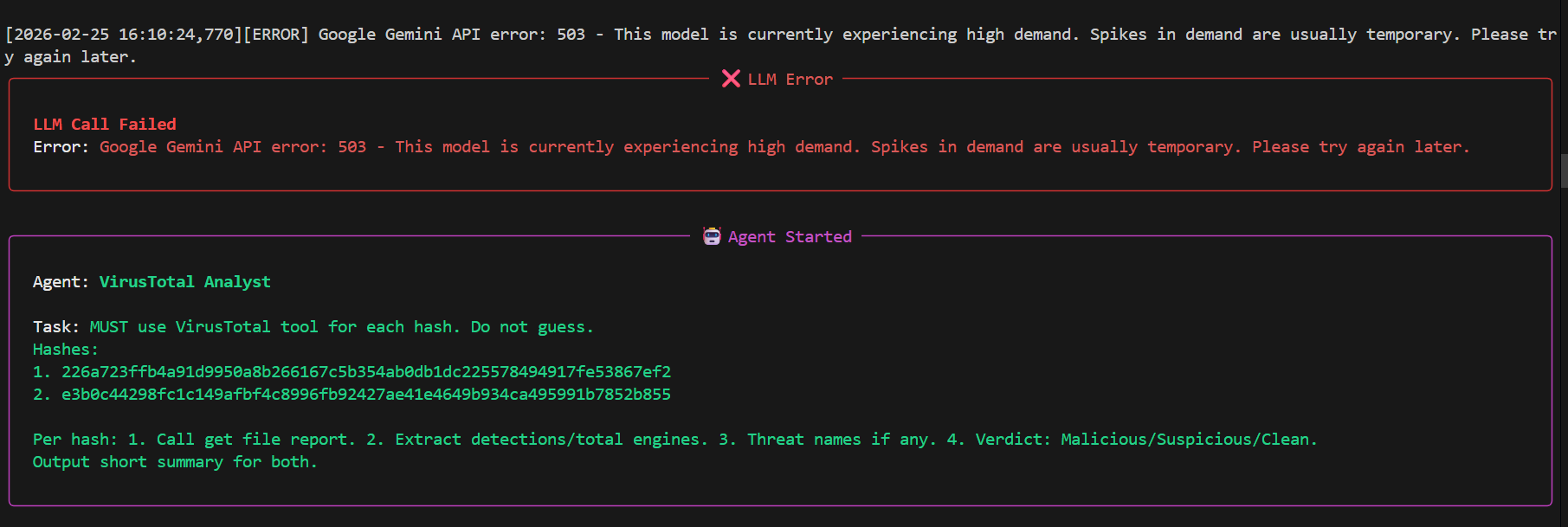
The output you want to see should look like this:
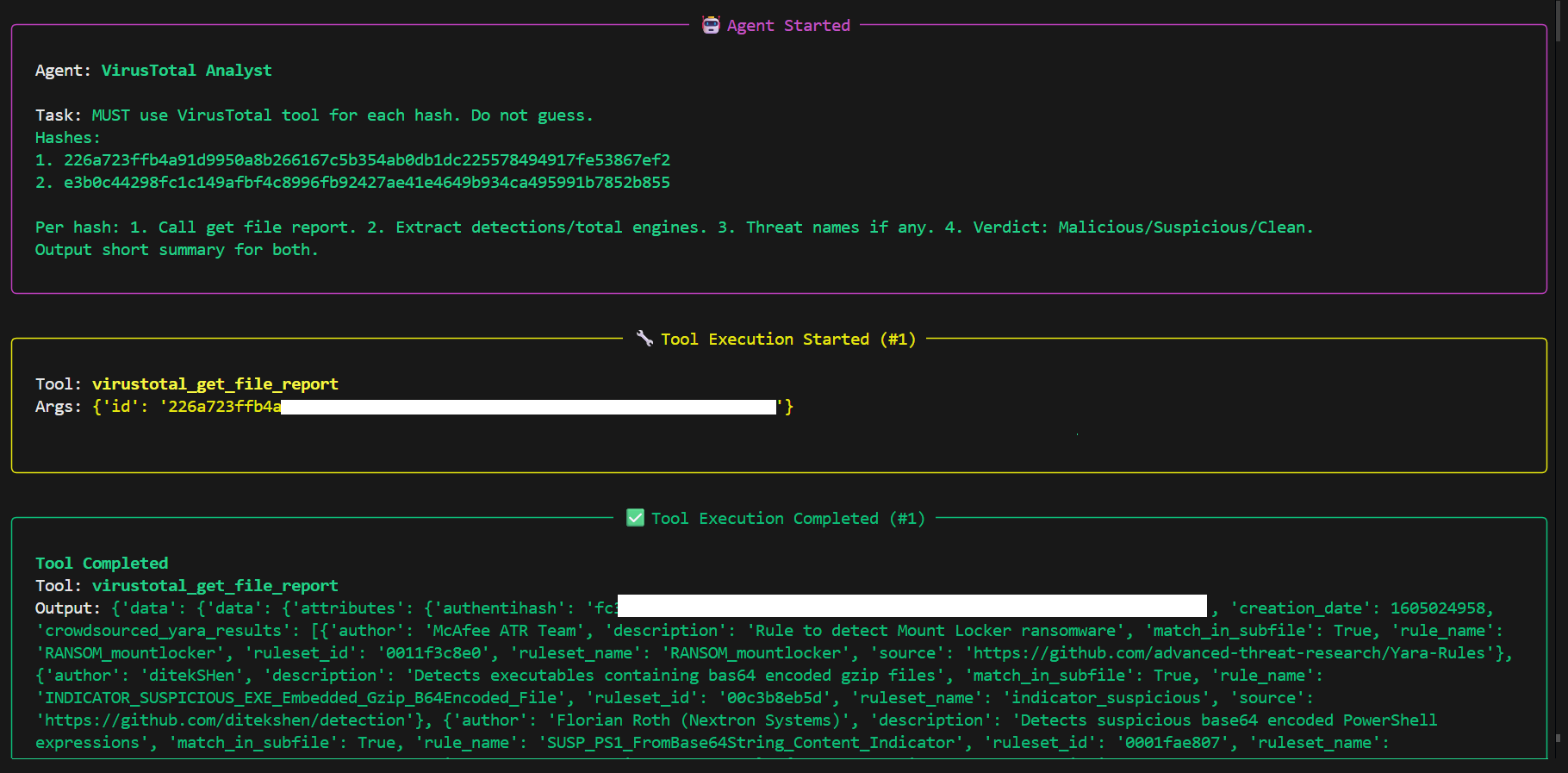
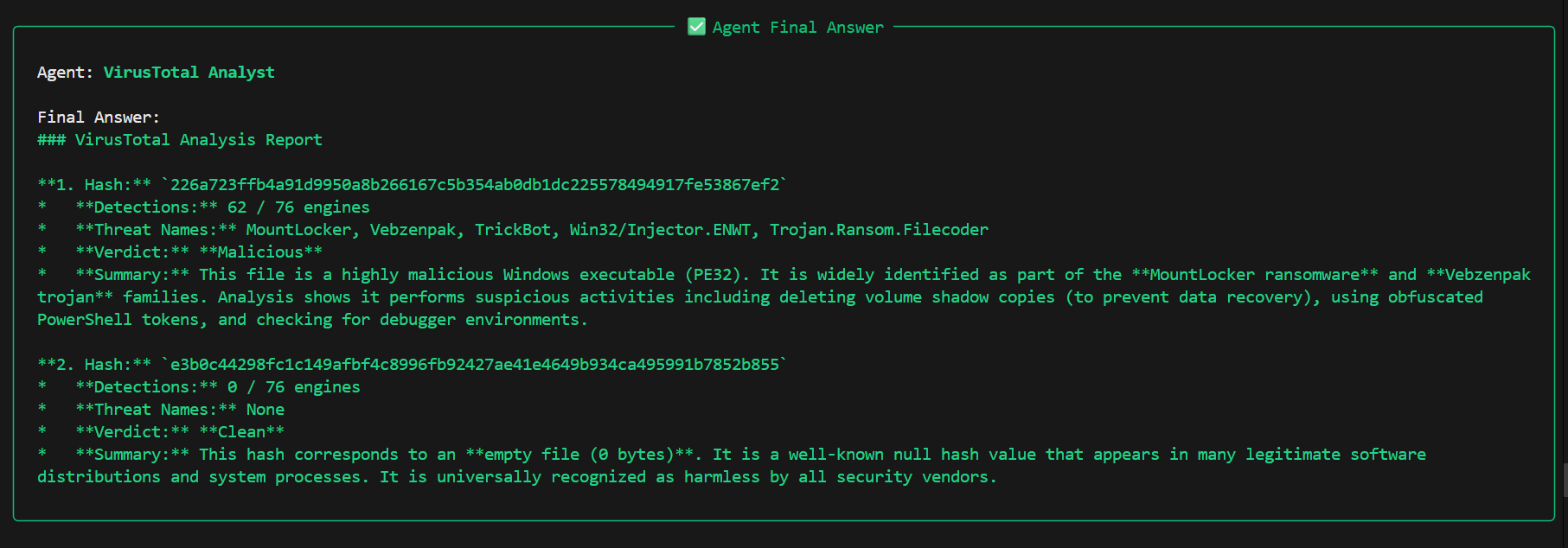
This response not only provides information about the hashes but also confirms the agent used VirusTotal to retrieve the data, proving your integration works correctly!
Summary
Congratulations, You’ve just built your first agentic AI systems with CrewAI. Let’s recap what we covered:
What You Learned:
• The fundamentals of AI agents and why they’re revolutionary
• How to set up CrewAI and create your first agent
• Building single-agent and multi-agent systems
• Connecting agents to external APIs using Composio
• Enabling agents to use tools
• Working with different LLMs and understanding their trade-offs
Key Takeaways:
• Agentic AI is powerful, but not always necessary. Remember to evaluate your use case first
• Setting up agents is straightforward; ensuring reliable performance is the real challenge
• Critical considerations include: result validation, prompt engineering, observability, model selection, performance and cost management
• Many advanced models are no longer free. Use trial credits wisely and never use free trials in production!
What’s Next:
In Part 2, we’ll look at defining agents with YAML files and using CrewAI’s built-in commands for easier deployments. We’ll also continue exploring different tools and delve into CrewAI Flows. Let me know if there’s anything else you’d like me to cover.
Building reliable agentic systems takes practice, experimentation, and patience. Keep testing, keep learning, and don’t hesitate to reach out to the community when you hit roadblocks.
More to come soon! Take care and happy building!